Overview
X-Ray Pixel
X-Ray Pixel Installation Guide
Customizing X-Ray Capture Settings
Contact Suppression
X-Ray SDK for Custom Events
How to Activate the Upgraded Version of X-Ray
Leads & Audiences
Create Audience Segments
Import SMS/Email Contact List
How to Turn on Lead Alerts for X-Ray Website Visitors
Email Automation Builder
Enable Email Suppression List
Clay Integration via Webhooks
How to Activate Customers.ai ESP
Integrations
Email Integration
CRM Integrations
Mailchimp Integration
Klaviyo Integration Part 1: Connect Customers.ai to Klaviyo
Klaviyo Integration Part 2: Activate Klaviyo Signal to Boost Flows
Sendlane Integration
HighLevel Integration
Google Sheets Integration
JSON Webhooks
Integration via Shopify's Custom API
Connect Your Salesforce Account
Connect to Applications via Zapier
Connect Bloomreach to Customers.ai
Braze Integration Guide
Connect Attentive to Customers.ai
HubSpot Integration
Meta Ads Tools
Google Ads Tools
Create Google Ads Custom Audience
Automate Data Import from Google Sheets to Google Ads
Sync Customers.ai Audience to Google Ads
Finding your Google Ads Client ID, Secret Token
Analytics
How to Build a Custom Report of Sales by Customers.ai Revealed Contacts Synced to Klaviyo
Bot Analytics
Public API
FAQs
Bot Issues
I Cannot Login or Sign Up for a Bot with Facebook Login
I Cannot Connect My Page Page to MobileMonkey Bot
Web Chat Isn't Showing On My Website
Bot Send Credits
Increase in my Number of Contacts
How Does Unsubscribe Work?
My bot is Responding with the Default Message or a Different Message
My Bot Won't Respond at all
Bot Response Issues Overview
Send Overage Automatic Upgrades
I Can't Find My Old Bot or my Dialogues
How to redeem your Facebook Ads Coupon
MobileMonkey Bot Legacy Subscriptions
What's a Main Menu?
MobileMonkey Bot Pricing Plans
Can I Use SMS on My Subscription Plan?
Facebook Messenger Issues
Handover Protocol
How Do I Create a Lookalike Ads Audience from Bot Contacts?
How to Get Approved for Facebook Subscription Messaging
Can't Find my Messages / Customer Conversations Are Not in My Messenger Inbox
Why am I getting Product Alerts from my Facebook Page?
Facebook Permissions Issues
Edit Your Facebook Permissions
How to Test Synced Ads on Facebook Ads Manager
My Facebook page doesn't show up on the list of pages to connect
Why Do I Have To Sign Up With Facebook?
Remove other Connected Apps on your Business Integrations
Refreshing Your Facebook Connection
Facebook's 24-Hour Rule
FAQs about the CAN-SPAM Act
FAQs about the CCPA
Known Issues
Report a Bug
Too Many Bananas!
Refresh Page Access Token Error/ Update Permissions
Issues with Ad Blockers & Privacy Extensions
Website Widget Not Appearing on iOS 12.1
InstaChamp
Connecting your Instagram account to a Facebook page
Pre-requisites in Connecting an Instagram Page
Why do I need to sign up for InstaChamp with my Facebook login?
Why Do I Have to Sign Up for Instagram Messaging with My Facebook Login?
I cannot connect my Page to InstaChamp
InstaChamp Sign-up Process
My Facebook Page is connected to MobileMonkey. Can I still use InstaChamp?
How to Create Autoresponders on InstaChamp
How do I link my Instagram Account to a Facebook Page?
Troubleshoot: Autoresponders not sending
How do I switch to an Instagram Business Account?
Basic Guide to Autoresponders
How do I enable third-party access to messages?
How do I find my InstaChamp Ambassador referral link and get credit for sales I make?
How to Use the InstaChamp Ambassador Share Banner Library to Monetize Your Audience
WordPress Plugin
- All Categories
-
- Klaviyo Installation Guide
Klaviyo Installation Guide
 Updated
by Raquel Bartolome
Updated
by Raquel Bartolome
Introduction
Learn how to connect Klaviyo with Customers.ai to seamlessly sync customer data and boost your marketing automation. This guide provides step-by-step instructions for integrating Customers.ai and Klaviyo, enabling automatic data synchronization to help you monitor customer behavior and deliver targeted messaging more effectively.
Before integrating, make sure you have:
- A Customers.ai account (Starter or Enterprise version).
- A Klaviyo account.
- API key access in Klaviyo to allow syncing.
Connecting Klaviyo to Customers.ai
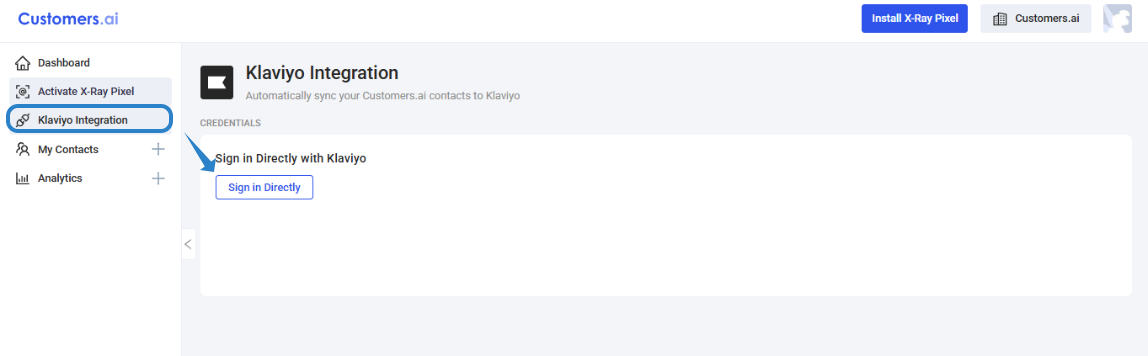
1. Log in to your Customers.ai account and navigate to Klaviyo Integration. Select Sign in Directly.
2. Click on Connect to enter your Klaviyo credentials and click on Log In. 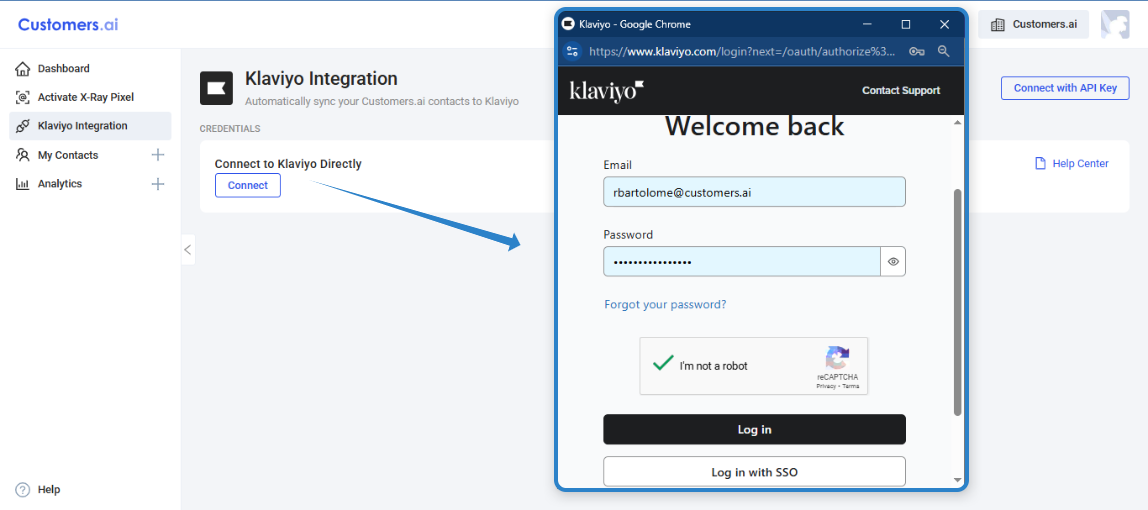
3. Allow Customers.ai to access the information on your Klaviyo account. You can view or remove access at any time in the app settings on the Integration page.
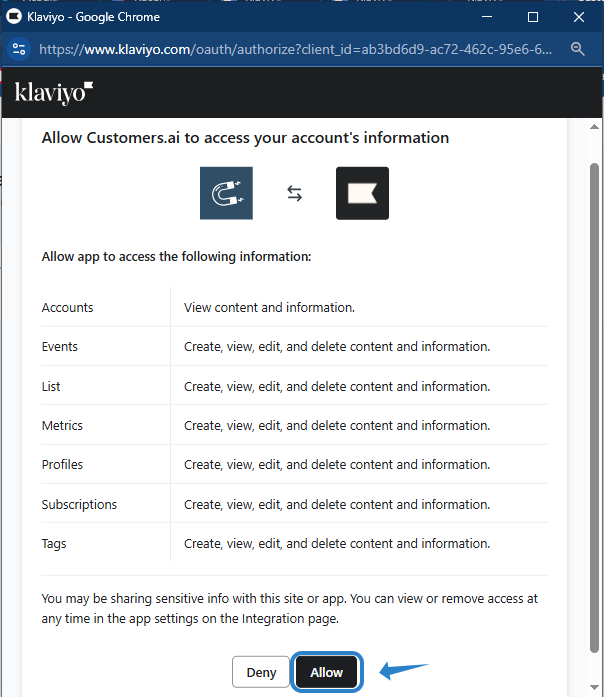
4. Once the integration had been established, you will see this screen with the integration method. 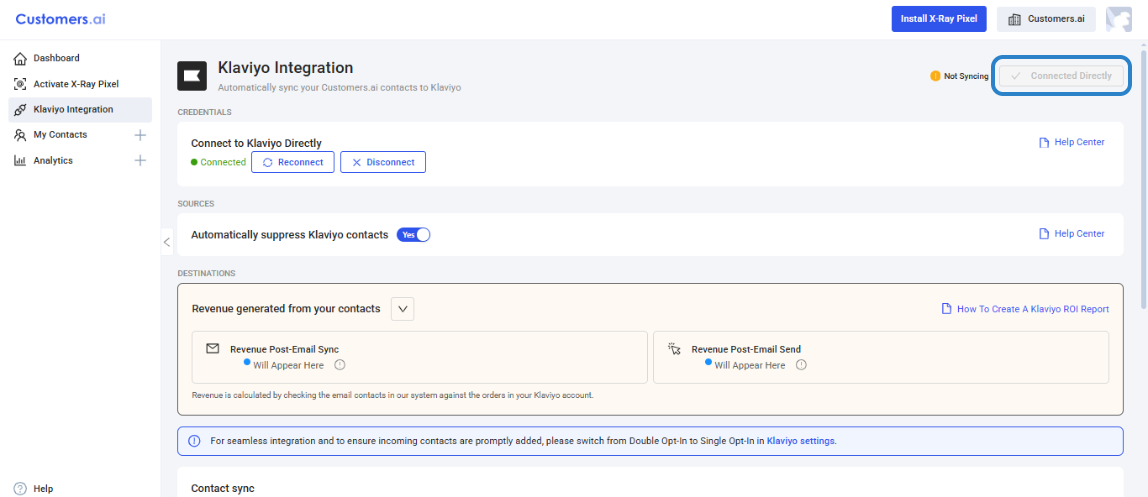
5. Go to your Klaviyo account and create a List. Make sure to change list consent to Single Opt-in.

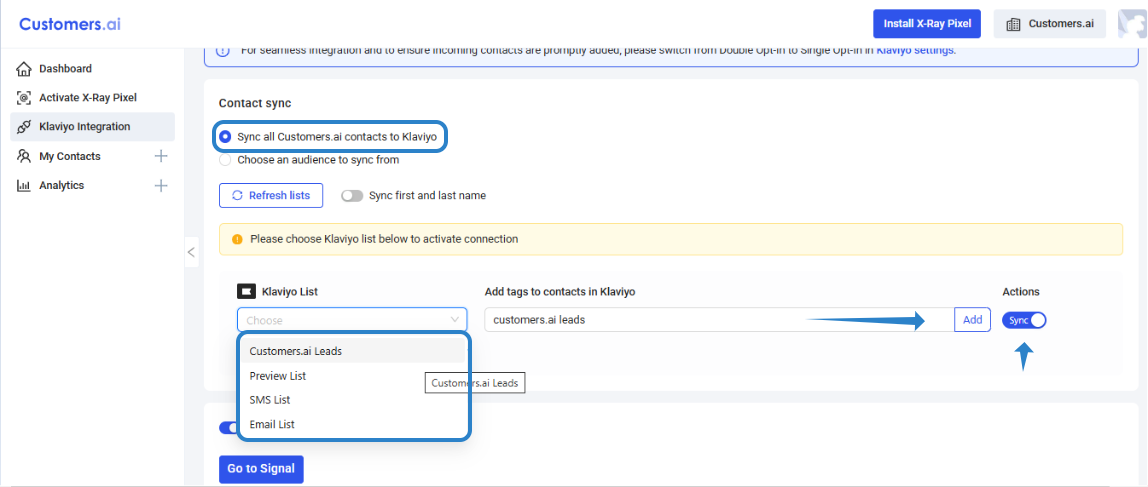
6. Scroll down to CONTACT SYNC and select from the option to Sync all Customers.ai contact to Klaviyo or Choose an Audience to Sync from.
To sync All Customers.ai contact to Klaviyo, select the Klaviyo List you created (with single opt-in consent), add a tag (optional) and toggle the SYNC radio button.
To choose an Audience to sync from, select the Customers.ai audience and the Klaviyo list (with single opt-in consent), add a tag (optional) and toggle the SYNC radio button. 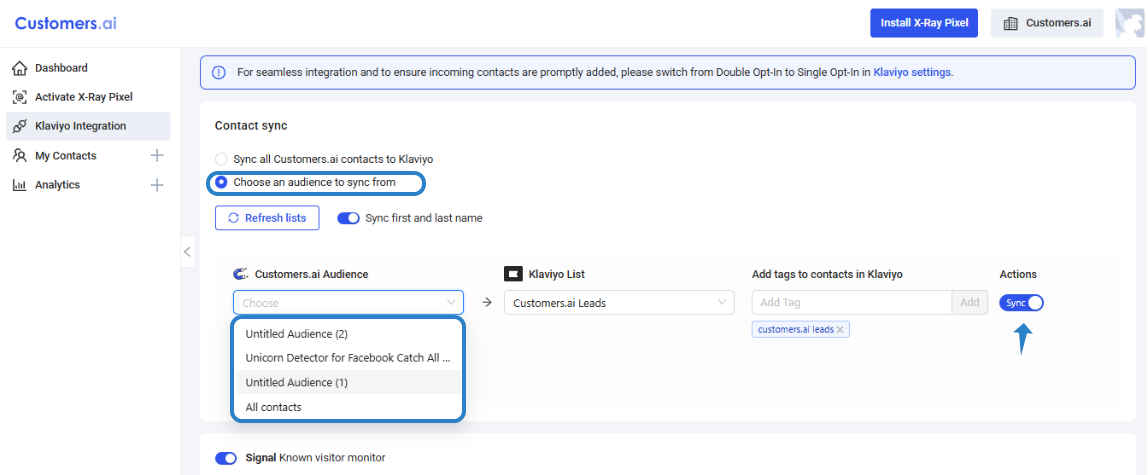
Confirm your integration is working
Once the integration is complete, monitor the Klaviyo list where Customers.ai leads are synced.
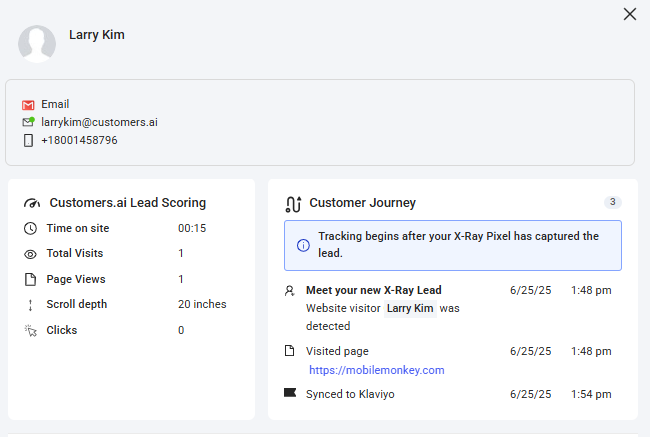
You can also cross-check that a contact is successfully synced to Klaviyo by clicking on the contact with the timestamp when it is synced to Klaviyo.
What Klaviyo + Customers.ai Integration Does
1. Lead Syncing
Automatically send leads collected via Customers.ai to Klaviyo. Sync user attributes like name, email, phone number, location, and custom tags into Klaviyo contact profiles.
2.Enhanced Audience Segmentation
Use behavioral and demographic data collected through Customers.ai to create targeted segments in Klaviyo.
3. Cross-Channel Automation
Trigger Klaviyo flows (automated campaigns) based on events or tags from Customers.ai.
4. Improved Attribution and Personalization
Track customer journey with accuracy and personalize messaging in Klaviyo based on that data.
Next ⬇⬇⬇
